
-
By: TrendnologiesAdmin
- November 29, 2025
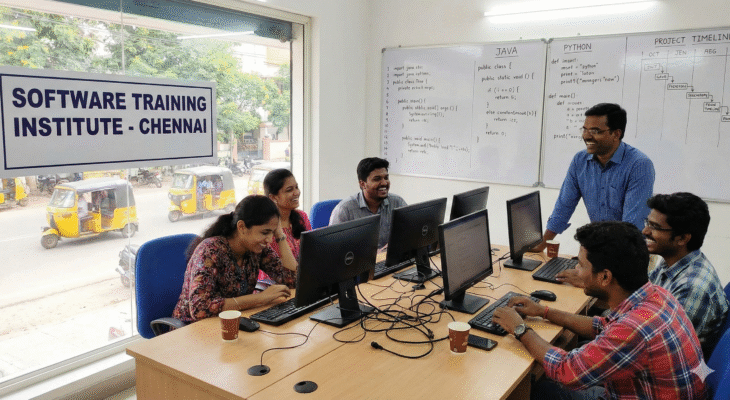
Behind the Scenes: How Software Training Institutes in Chennai Prepare You for Real-World Projects
Behind the Scenes: How Software Training Institutes in Chennai Prepare You for Real-World Projects For anyone starting a career in IT, learning theory alone is no longer enough. The industry expects job seekers to understand tools, frameworks, workflows, teamwork, and problem-solving — the same way they would inside a real company. That’s why practical software training institutes in Chennai has become the first choice for students, professionals, and career switchers who want to stand out. Today, many aspirants ask an important question:“What really happens behind the scenes inside software training institutes? How do they prepare students for real-world projects?” This in-depth guide reveals exactly that. You’ll learn how training centers shape job-ready professionals using project-based learning, practical sessions, real environments, and industry-driven guidance. Let’s go behind the curtains. Why Practical, Project-Based Learning Matters More Than Ever Table of Contents Modern companies don’t hire based on theoretical understanding alone. They hire people who can apply skills, understand project workflows, and contribute from day one. Here’s why project-based learning has become a game-changer: You learn by doing, not just listening You understand real issues like bugs, deadlines, version conflicts, testing gaps, and deployment challenges You can showcase real projects during interviews You gain confidence to work in professional environments This is where software training institutes in Chennai play a crucial role — they recreate real IT environments inside the institute to prepare you for real corporate life. Inside Modern Software Training Institutes in Chennai: What Actually Happens 1. Hands-On Labs That Replicate Real IT Environments Leading software training institutes in Chennai focus heavily on setting up lab environments that allow students to practice just like they would in real companies. These labs include: Real tools used by industries Cloud-based virtual machines DevOps pipelines for testing and deployment Real databases Real bug-tracking systems Git version control just like corporate teams This practical environment ensures that students don’t just learn how a tool works — they learn how teams collaborate, commit code, raise issues, fix bugs, and manage versions exactly the way companies do. 2. Project-Based Learning from Day One A strong IT career is built on projects. Institutes design their courses with: Mini projects after each module Weekly coding or testing assignments End-to-end capstone projects Real-time scenarios based on industry use cases For example: Testing students work on live bug logs, write test cases, and execute test cycles Full stack students build dashboards, APIs, portals, and databases Data science students handle real datasets, build models, and visualize insights This approach allows students to apply concepts immediately, not months later. 3. Real-Time Project Simulations with Teams Today’s IT ecosystem runs on teamwork. Institutes therefore create simulated project teams inside the classroom: A trainer acts as the Product Owner or Team Lead Students are assigned roles such as developer, tester, analyst, or designer Projects follow Agile or Scrum methodology Daily standups and weekly sprints are conducted Students work collaboratively on shared repositories This simulation teaches students: How to communicate professionally How to collaborate on files and repositories How to follow deadlines How to solve problems as a team These are the exact skills interviewers look for. 4. Exposure to Real Tools and Technologies Used in Companies A major advantage of practical software training institutes in Chennai is hands-on exposure to industry tools such as: Git & GitHub JIRA Postman Selenium / Cypress / Playwright MySQL / MongoDB / PostgreSQL AWS / Azure basics Jenkins & CI/CD pipelines Python, Java, JavaScript tech stacks Power BI & Tableau for analytics By the time students complete their training, they are no longer beginners. They already know how to operate the tools that companies expect them to use. 5. Working With Real-Life Case Studies Institutes use practical case studies such as: Ecommerce workflows Banking applications Healthcare systems Ticket booking platforms Logistics dashboards These real-world use cases help students: Understand application architecture Learn how features interact Analyze bugs and issues in a real system Work on requirements like an actual employee This gives a clear advantage during interviews because students can talk confidently about application workflows. 6. Soft Skills & Interview Readiness Training Project knowledge alone won’t get you hired. Companies expect students to be: Confident Clear in communication Good in problem-solving Able to explain their work That’s why institutes provide: Resume preparation sessions Mock interviews HR training Communication improvement sessions Portfolio preparation Git project showcase guidance These sessions ensure students are ready to face real interview challenges. 7. Placement Support & Real-Company Connections One of the biggest strengths of Chennai’s training ecosystem is the network. Institutes maintain connections with: Startup founders HR professionals IT managers Hiring partners Portfolio-based clients They regularly send student profiles, arrange interviews, and guide learners on how to handle technical rounds. The combination of practical training + project experience + placement support makes students fully job-ready. 8. Continuous Mentorship and Industry Guidance Experienced trainers guide students on: Career choices Job roles Skill development paths Portfolio improvement Industry expectations How to grow after getting placed This personalized mentorship is something students can’t get from online videos or self-learning. 9. Real-Time Assessments & Performance Tracking To ensure students learn properly, institutes conduct: Weekly project reviews Test case writing assessments Code reviews Debugging challenges Real-world scenario tasks These assessments mirror real working conditions and help students improve continuously. 10. Why Project-Based Learning Works Better Than Traditional Classroom Teaching Traditional learning focuses on memorizing concepts, notes, and theory-heavy content. But IT companies don’t hire based on memory — they hire based on the ability to execute. That’s why software training institutes in Chennai emphasize project-based learning. Project-based learning helps students learn faster, remember concepts longer, build confidence, solve problems independently, showcase real results to employers, and create strong resumes and portfolios. This practical, hands-on approach has become the backbone of modern IT upskilling. Conclusion: Real IT Careers Are Built on Real Projects Behind the scenes, training institutes work hard to replicate the real corporate environment — the tools, the challenges, the teamwork, the deadlines, and the project workflows.
Read More